Speech Recognition & Synthesis
Publisher Description


Speech recognition and synthesis for your device.
Power your device with the magic of Google’s text-to-speech and speech-to-text technology.
Google Speech-to-Text functionality
Speech Recognition provides speech-to-text functionality to Google and other third party apps to convert what you say to text. For example, it can be used by:
• Google Maps when you use your voice to search places
• Recorder App to transcribe your recordings on device
• Phone App Call Screen feature to get a real-time transcription of your caller
• Accessibility apps like Voice Access for operating your device through voice
• Dictation or keyboard apps you might use to dictate text messages through voice
• Apps that contain a search by voice feature so that you can quickly search for your favorite shows or songs
• Language learning apps that recognize what you say as you practice a new language
• …and many other applications in Play Store
To use Google Speech-to-Text functionality on your Android device, go to Settings > Apps & notifications > Default apps > Assist App. Select Speech Recognition and Synthesis from Google as your preferred voice input engine.
Google Text-to-Speech functionality
Speech Services powers applications to read the text on your screen aloud. For example, it can be used by:
• Google Play Books to “Read Aloud” your favorite book
• Google Translate to speak translations aloud so you can hear the pronunciation of a word
• Talkback and accessibility applications for spoken feedback across your device
• …and many other applications in Play Store
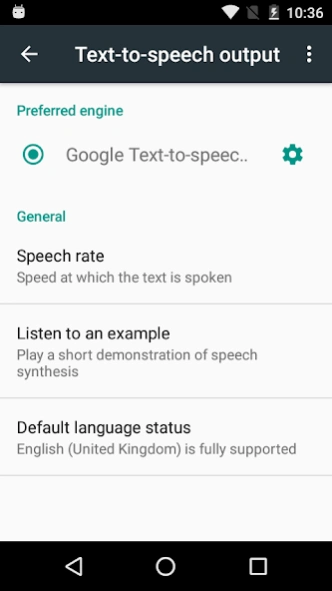
To use Google Text-to-Speech functionality on your Android device, go to Settings > Languages & Input > Text-to-Speech output. Select Speech Recognition and Synthesis from Google as your preferred engine.
Note, on many Android devices, Speech Recognition and Synthesis from Google is already available, but you can update to the latest version here.
About Speech Recognition & Synthesis
The company that develops Speech Recognition & Synthesis is Google LLC. The latest version released by its developer is 1.0. This app was rated by 1 users of our site and has an average rating of 4.0.
To install Speech Recognition & Synthesis on your Android device, just click the green Continue To App button above to start the installation process. The app is listed on our website since 2026-10-13 and was downloaded 109 times. We have already checked if the download link is safe, however for your own protection we recommend that you scan the downloaded app with your antivirus. Your antivirus may detect the Speech Recognition & Synthesis as malware if the download link to com.google.android.tts is broken.
How to install Speech Recognition & Synthesis on your Android device:
- Click on the Continue To App button on our website. This will redirect you to Google Play.
- Once the Speech Recognition & Synthesis is shown in the Google Play listing of your Android device, you can start its download and installation. Tap on the Install button located below the search bar and to the right of the app icon.
- A pop-up window with the permissions required by Speech Recognition & Synthesis will be shown. Click on Accept to continue the process.
- Speech Recognition & Synthesis will be downloaded onto your device, displaying a progress. Once the download completes, the installation will start and you'll get a notification after the installation is finished.
Program Details
System requirements
Download information
Pricing
Version History
version
posted on 2026-10-13
Your app has a new name: “Speech Recognition and Synthesis from Google”. The Speech Recognition and Synthesis from Google app not only provides text-to-speech but also empowers applications with speech-to-text functionality to convert your voice to text. Read more in the “About this app” section.
version
posted on 2026-05-26
version googletts.google-speech-apk_20230626.01_p1.543879258
posted on 2023-07-25
Your app has a new name: “Speech Services by Google” and a new logo. The app also supports new functionality. The Speech Services by Google app not only provides text-to-speech but also empowers applications with speech-to-text functionality to convert your voice to text. Read more in the “About this app” section.
version
posted on 2021-07-19
. Added support for French (Canadian), Javanese and Sundanese.
. More voices to choose from for English (Australian), English (United Kingdom) and French (France).
. All voices for a language are now downloaded together, saving storage space on your device.
. Performance improvements for 64-bit devices.
. Various other improvements to our voices.
version
posted on 2019-10-01
. Added support for French (Canadian), Javanese and Sudanese.
. More voices to choose from for English (Australian), English (United Kingdom) and French (France).
. All voices for a language are now downloaded together, saving storage space on your device.
. Performance improvements for 64-bit devices.
. Various other improvements to our voices.
version
posted on 2018-01-08
• Added support for Estonian, Romanian and Slovak.
• Various other improvements to our voices.
version
posted on 2016-06-06
• Added support for Swedish and Vietnamese.,• Bug fixes and improvements.
